Sere Veil
A downloadable game
Welcome to the world of Sere Veil!
Explore this strange world and uncover how it came to be this way.
This is the first release of Sere Veil, please enjoy the game. Any feedback or bug reports are welcome.
Release Notes for Release 1.1:
- Sprinting has been added! Hold the shift key to move 1.5x faster
- Move Counters now turn white when you have performed an action in battle
- The turn timer has been removed, this was not fun to play with and made the game feel worse
- When you do not have enough mana to perform a move, the game now indicates this
- The game has music! No more silent overworld!
- More sound effects have been added to the game
- Menu feedback has been implemented, some indicators and sound effects will make it so menus feel much better to use
- Cutscenes, the first cutscene of the game has been added, this can be accessed by pressing 'New Game' on the main menu (Pressing Continue or Load Game will load the game directly, skipping the cutscene)
- A cutscene to end the demo has also been added
- Various bug fixes
TUTORIAL:
The Overworld:
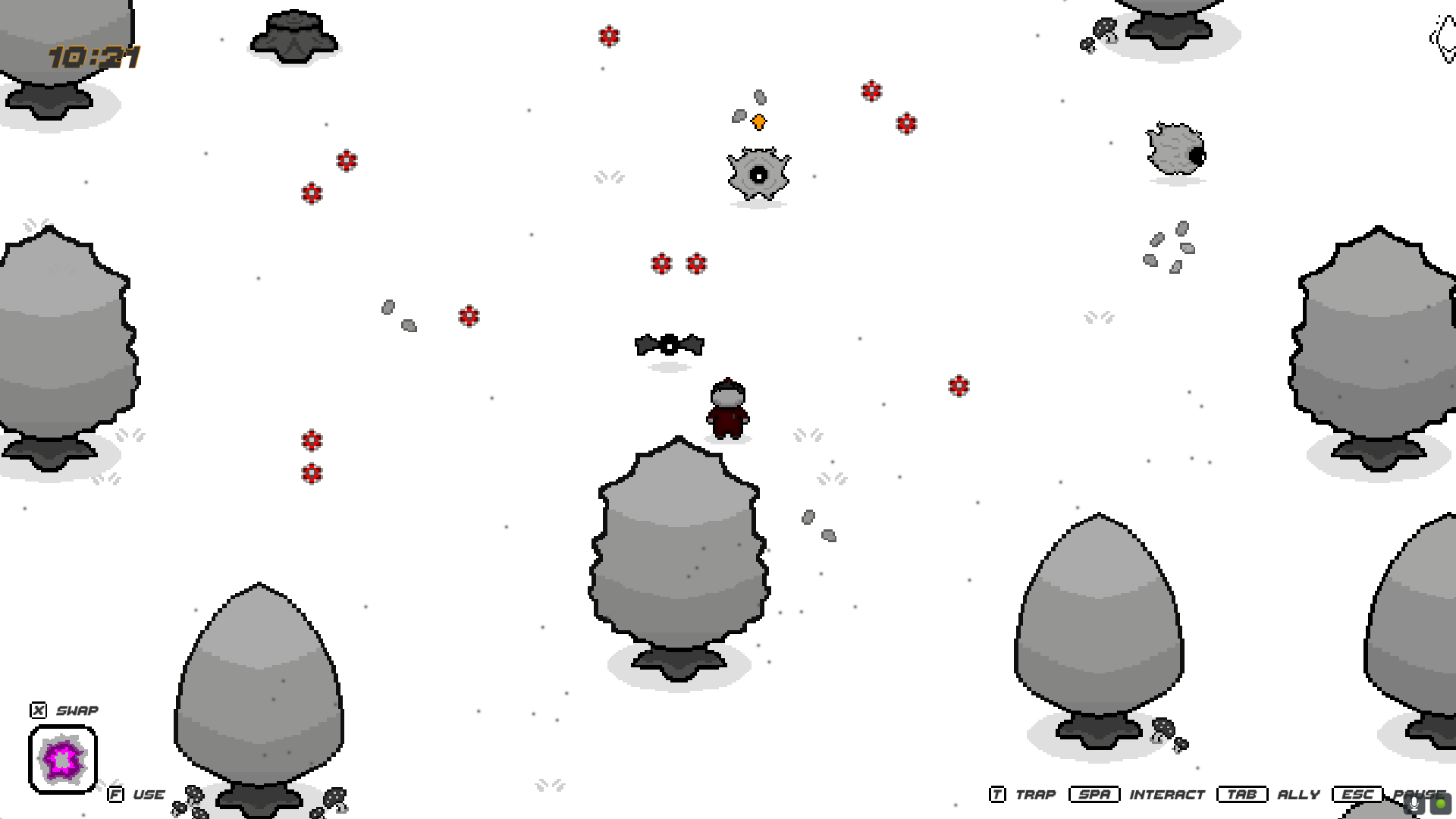
Exploring the overworld of Sere Veil is something to be greatly encouraged. You can encounter different types of monsters on your travels, which you can battle or you can trap.
Monsters have their own day and night cycles when they are in the Overworld. Be sure to explore everywhere at all times to encounter them all.
As a tip, the colour of the flowers around enemies indicate the type of moves they will use!
- Magenta: Physical
- Red: Fire
- Cyan: Ice
- Green: Wind
- Yellow: Electric
Trapping:
To trap an enemy, you will need to place a trap. If an enemy walks over this, whether in battle or not, they will be captured. If they do not break out, they will be added to your party. Once your party is full any captured monster will be sent to the starting village, to add them to your party, all you need to do is talk to them while you have an empty slot in your party (Seen in the Ally Monster Menu).
Something to watch out for however, you may only place 1 trap at a time, and should a battle start or end, any placed traps will disappear.
Koy (Starting Village):
You can send any monster you have trapped and captured to this village. These 'Allies' will wander around Koy, speaking to any one of them will allow you to add them to your party.
Allies:
Once you have at least 1 ally in your party, you can summon 1 of your allies via the Ally Monster Menu! They will follow you around the world and will participate in battles with you. However, be careful as when an ally dies, it will be permanent. Therefore, please ensure you have lots of allies as you explore Sere Veil.
You can swap your allies outside of battle as well as equip items to them that you find on your travels, once again through the Ally Monster Menu.
Battles:
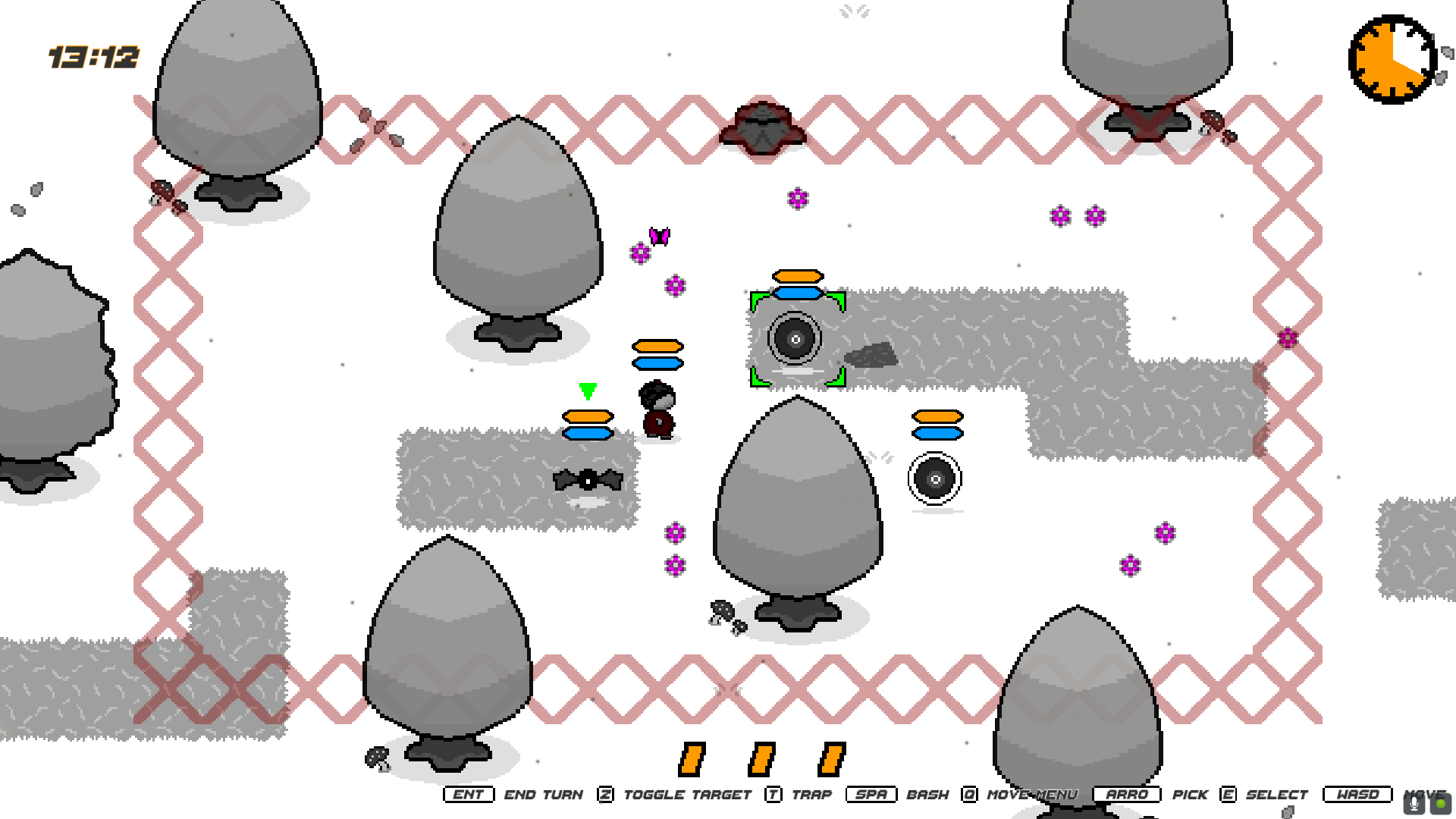
When exploring the world of Sere Veil, you will enter into battles with monsters. The game will switch to a turn based, grid system. When it is your turn (Or your allies) you can move your character around the battle field. Be careful however, you only have a limited number of spaces you can move, and you cannot undo any action.
You can attack enemies by going up to them and pressing the space bar when you are 1 tile away. This will perform the basic 'Bash' attack. Should you want to use a different move, if your character possesses them, they will appear in the move selector, accessed by pressing 'Q'.
When hovering over a move, green range tiles will show, indicating where either a Tile Move can be placed, or if an enemy is in range of an attacking move (You can still move around the battle field while this menu is open!). The move type of each move is highlighted when you select a move, the shadow of that move will light up in the colour of the type it is associated with: Yellow for Electric, Magenta for Physical, Green for Wind, Red for Fire, and Cyan for Ice.
There are 2 types of move, Tile Moves or Attacking Moves
Attacking Moves: These are moves that deal damage to an opponent.
Tile Moves: These are moves that are placed on the battle field, and influence how the game is played.
- Scorch Tile: A wall, characters cannot move over this tile, they must go around.
- Permafrost Tile: Slippery tile, if a character steps on this, they will slide across to the adjacent tile.
- Cyclone Tile: The tile will blow you around, step on it and it will send a character in a 2 tiles in a random direction.
- Electrify Tile: This will shock you, step on this tile and it will immediately end a character's turn.
- Glyphs: These are tiles that when stood on will increase the power of a move of its corresponding type.
Once you have performed you action for turn, the move indicators will turn white to indicate the only remaining thing you can do is move.
A battle is won, once there are no remaining enemies, either because they were trapped or defeated. You will gain experience as you battle, letting you character and allies level up. As you get stronger, so too will the enemies in the game, they level as you do!
Campfires:
You can switch what type of moves you want your character to use as campfires. Select the 'Skills' option and select one of the 4 options presented to you to change the moves you use as well as your weaknesses and resistances.
Controls:
The game is fully playable with only a keyboard, please keep in mind that the space bar and 'E' are used to select options in menus, including the Main Menu.
All controls will be displayed to the player whilst they are playing the game. However, they have been listed below:
Overworld/Dungeon:
- WASD or Arrows: Move
- Space Bar: Interact
- X: Cycle Ability
- F: Perform Ability
- T: Place Trap
- ESC: Pause Menu
- TAB: Ally Monster Menu
- SHIFT: Hold down to sprint
Battle:
- WASD: Move
- Space Bar: Bash (The default physical attack)
- Q: Toggle Move Selector
- Arrows: Navigate Move Selector
- E: Select Move (When Move Selector Open)
- ESC: Cancel Selected Tile Move
- Z: Toggle Selected Enemy
- T: Place Trap
- Enter Key: End Turn
Menus:
- WASD or Arrows: Navigate
- E or Space: Select
- Q: Back (On Pause Menu)
- Q: Send Monster to Village (On Ally Monster Menu)
- ESC: Close
- Tab: Close (Only on Ally Monster Menu)
- R: Open Equip Items Menu (Only on Ally Monster Menu
FUTURE PLANS:
Please also keep in mind a save system for the game has not yet been implemented, navigating back to the main menu will store your current progress but as soon as you close the game all progress will be lost. Therefore on the main menu, the 2 options Continue and Load Game all do the same thing as of right now. Additionally, the 'Save' option in the campfire menu also does not currently do anything.
For abilities that you can use in the overworld, please also note that only the 'Fireball' ability currently does something, whilst they can be used, all other abilities currently do not interact with anything.
More features are planned and will come in the future!
End Notes:
Thank you for listening to my Ted Talk! I understand this is quite long winded but I truly believe reading through the tutorial will be beneficial in your enjoyment of the game. In the future, I am hoping to include the tutorial within the game itself.
This game is still in development and there is a long way to go, but after 2 years of solo development, it is time to start releasing this game and letting people play it.
Finally, thank you for playing Sere Veil, I hope you have as much fun playing it as I had making it.
Credits:
I did not create the music in this game, this was created by Leonardo Calvo, you can find the music I have used in this game here: https://thesoundrack.itch.io/sad-music-pack
The menu SFX were from this pack by Atelier Magicae: https://ateliermagicae.itch.io/fantasy-ui-sound-effects
Download
Leave a comment
Log in with itch.io to leave a comment.